Red Arrow Icons: Curved Directional
Modern Visual Tools for Clear Communication
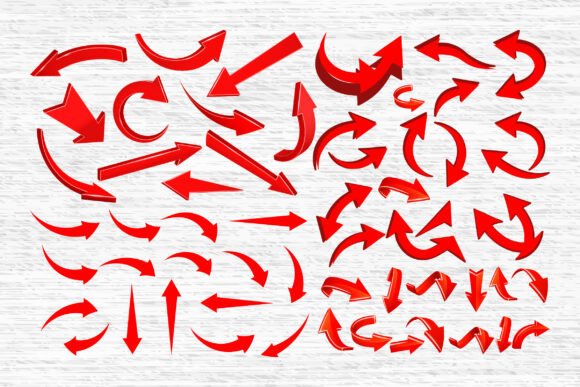
Red Arrow Icons. Curved Directional is a curated collection of vector-based arrow graphics designed to guide, highlight, and enhance visual storytelling. With 57 unique variations in SVG, PNG, PDF, EPS, AI, and DXF formats, this set offers flexibility for creators across industries. Whether you're designing an infographic, a presentation, or a digital marketing campaign, these arrows bring clarity and movement to your visuals without overwhelming the layout.
The curved and circular designs add a soft, dynamic touch compared to rigid straight arrows. They suggest flow, transition, and continuity—perfect for illustrating processes, directions, or emotional arcs in a design. Their clean, minimalist style ensures they blend well into both modern and classic aesthetics, making them ideal for UI/UX design, educational materials, and social media content.
Design Flexibility for Diverse Creative Needs
These icons aren’t limited to one use case. Designers can layer curved arrows to show movement in a timeline, guide the viewer’s eye through a layout, or indicate a shift in direction. For educators, they can simplify complex concepts in lesson plans or digital whiteboards. Entrepreneurs and marketers can use them to highlight steps in a customer journey or to illustrate growth loops in business models.
- UI/UX designers can use them to enhance navigation flow in app interfaces
- Bloggers and content creators can integrate them into infographics and Canva templates
- Print-on-demand creators can apply them to stickers, planners, or T-shirt designs
- Educators can incorporate them into digital or printable learning materials
Because the files are compatible with Cricut, Silhouette, and other cutting machines, crafters and small business owners can also use these arrows in physical products like vinyl decals, greeting cards, or digital scrapbooks.
How to Use Curved Directional Arrows Effectively
While these icons are visually appealing, their impact lies in how you apply them. Here are a few practical tips to ensure your designs stay clear and effective:
- Match the tone of the arrow style to your overall design—curved arrows work best in organic, flowing, or soft-themed visuals
- Use contrast to make arrows stand out against backgrounds, especially in digital presentations or posters
- Group related arrows to show sequences or connections without cluttering the layout
- Align consistently with other design elements to maintain visual harmony and readability
For digital designers, layering curved arrows in Figma or Adobe XD can help illustrate transitions between screens or steps in a process. For print, the high-resolution PDF and EPS files ensure professional output for brochures, posters, or signage.
From Web to Print: Cross-Platform Applications
One of the standout features of Red Arrow Icons. Curved Directional is its adaptability across formats. A digital marketer might use the SVG files in a landing page to guide users toward a call-to-action. A teacher might insert PNGs with transparent backgrounds into Google Slides to illustrate a learning path. A small business owner could import DXF files into a laser cutter to create directional signage for a retail space.
Because the files come in multiple formats, you're not limited by software restrictions. Whether you're using Inkscape, Illustrator, Cricut Design Space, or Silhouette Studio, you'll find a version that works for your workflow. This cross-compatibility makes the set a reliable asset in any creative toolkit.
Staying Organized with Icon Sets
Managing a large icon set can be overwhelming, especially when working across multiple projects. To keep your workflow smooth:
- Organize files by format—keep SVG, PNG, and PDF versions in separate folders for quick access
- Name files clearly based on shape or intended use (e.g., “loop-arrow,” “circular-pointer”)
- Create a style guide for your projects to maintain consistent use of arrow colors, sizes, and styles
- Test arrows at different scales to ensure they remain legible on mobile, print, and large-format displays
These habits help maintain consistency across branding, digital assets, and printed materials—especially useful for freelancers and small businesses managing multiple client projects.
Real-World Project Ideas
Let’s look at a few practical ways you can apply these curved directional icons in your work:
- Infographics: Use looping arrows to show cyclical processes like the customer journey or product lifecycle
- Presentations: Guide your audience through slides with subtle curved arrows that point to key data or visuals
- UI Design: Implement curved arrows in app tutorials to demonstrate swipe gestures or interactive paths
- Printables: Design habit trackers, planners, or vision boards with directional cues to help users follow along
- Social Media: Create engaging Instagram Stories or Pinterest pins with arrows that lead viewers to swipe or click
Each of these applications benefits from the clarity and visual rhythm that curved arrows provide. They’re not just decorative—they serve a functional role in guiding attention and reinforcing the message.
Final Thoughts: A Versatile Visual Tool
Red Arrow Icons. Curved Directional is more than a set of graphics—it's a toolkit for visual communication. Whether you're crafting digital experiences or physical products, these icons help you guide your audience with clarity and style. Their flexibility across formats and platforms makes them a valuable resource for anyone who wants to enhance their creative output without sacrificing quality or usability.
By choosing the right arrow for the right context and applying it thoughtfully, you can elevate your designs from functional to expressive. And with 57 options to choose from, there’s always a new way to direct attention, illustrate movement, or enhance flow in your next project.